
Imagine joining a company and receiving an account to sign in to your computer and access your department’s folders. How do systems recognize that identity? And why does the same account open one folder but receive “access denied” in another?
In many Windows networks, part of this organization depends on the Domain Controller (DC). Understanding its role helps distinguish login problems, permission failures, and administration risks. Let us follow a fictional employee, Ana, from her first access through the precautions around privileged accounts.
The controller is the server; Active Directory is the service
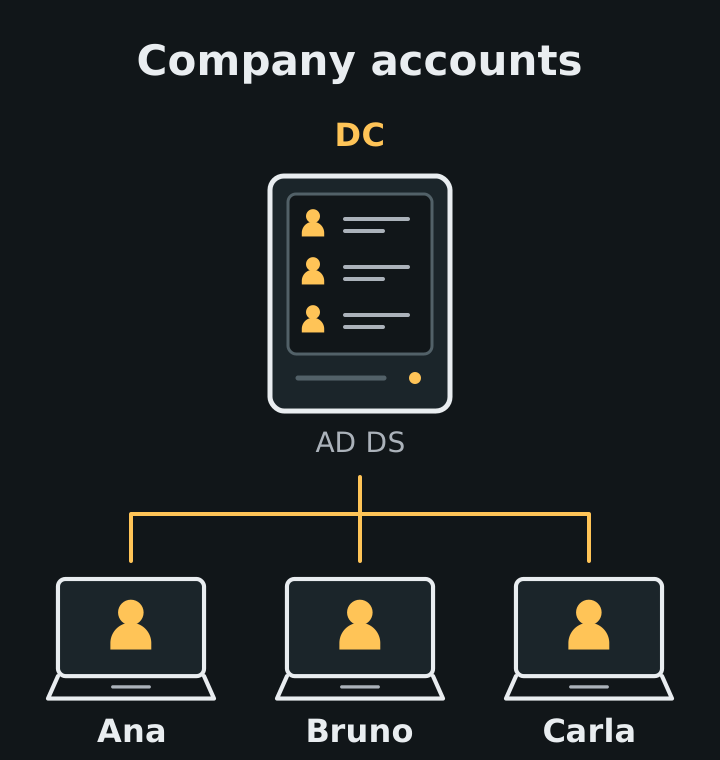
Active Directory Domain Services (AD DS) is a directory service: it organizes information about identities, computers, and other network objects. An AD DS domain brings these objects together in an administrative structure. The DC is the server running AD DS, maintaining directory data, and providing authentication services.
In our example, Ana has a domain account and her computer was joined to the domain by the responsible team. This allows centralized identity administration instead of creating an independent account on every machine. Microsoft’s AD DS overview introduces this organization.
Think of an institutional register: the directory stores records; controllers keep the register available and handle requests. This analogy separates the roles. The directory also contains sensitive authentication information, beyond names in an address book.
A company domain is not a website registration
The term “domain” also appears in website addresses. Registering a public name does not create an AD DS domain or a controller. Although AD DS uses DNS names, these structures serve different purposes.
The Domain Name System (DNS) participates in controller discovery. As the DNS and AD DS documentation explains, clients use DNS to locate directory services. If Ana’s computer queries an unsuitable DNS server, it may struggle to find a DC even while websites open normally.
This changes the investigation: “the internet works” does not prove domain discovery works. The team must check the expected configuration. Replacing corporate DNS with a public resolver on your own can disrupt this process.
From login to folder: identity and permission are different decisions
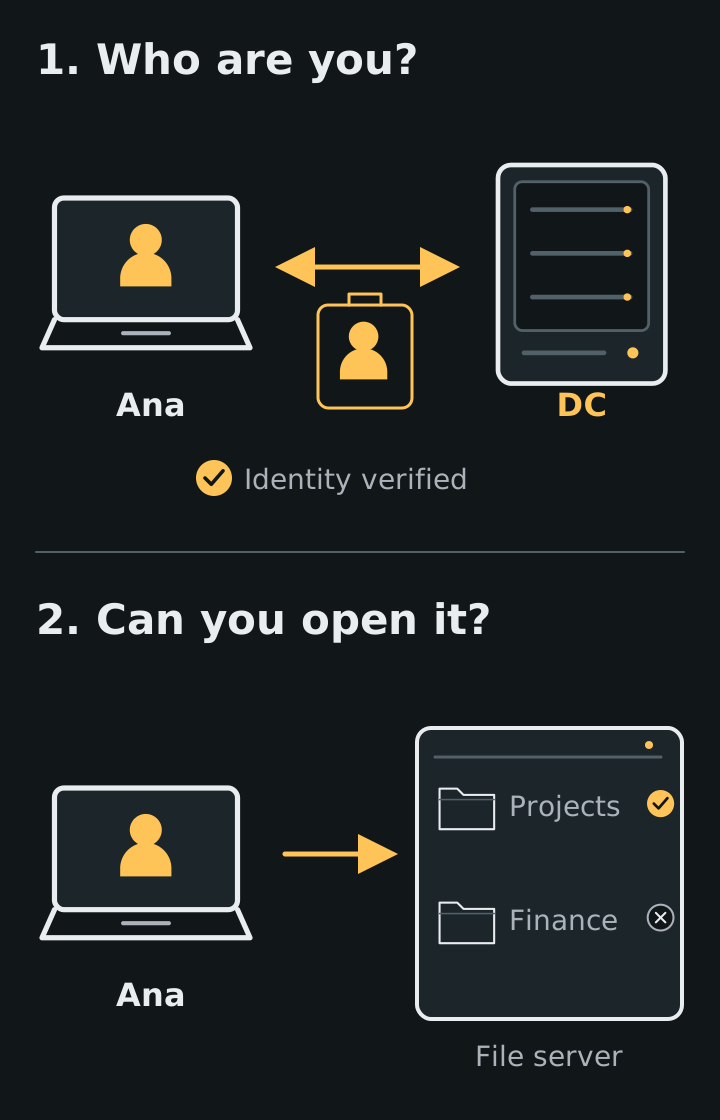
Authentication verifies the identity presented. Authorization determines which actions that identity can perform. Ana being able to sign in to her computer does not mean she can read every company document.
A common flow uses Kerberos, an authentication protocol. The DC runs the Key Distribution Center (KDC). In simplified terms, the client proves Ana’s identity to the KDC and receives a Ticket Granting Ticket (TGT); it then uses that ticket to request a ticket specifically for the file service. The Kerberos overview details this exchange.
On receiving the service ticket, the file server verifies the identity and evaluates applicable permissions. In Ana’s scenario, permissions grant her group read access to the Projects folder but no access to Finance. The access control documentation explains the relationship between identities, groups, and resource permissions.
The DC does not act as a mandatory passage for the contents of every file. Tickets can be reused while valid, and other authentication mechanisms exist. “Access denied” on a single folder calls for examining permissions and context instead of assuming the entire controller has failed.
Group policies organize settings
Beyond accounts, administration must configure computers and users. Group Policy Objects (GPOs) collect settings that can be applied in an AD DS environment. The Group Policy overview describes this centralized management.
A policy can configure firewall rules for a set of computers. This does not mean every GPO affects the whole company: links, hierarchy, and filters influence its reach. The processing documentation explains these criteria.
If Ana’s computer shows a different configuration, the useful question is: “which policy should reach this machine, and which was actually applied?” Changing a production GPO to experiment can affect other people. Beginners should observe the result with the team or practice in their own lab.
Why the DC requires special protection
Centralizing identities simplifies administration and concentrates responsibility. Microsoft warns that improper privileged access to a DC can enable serious directory changes and threaten managed systems and accounts.
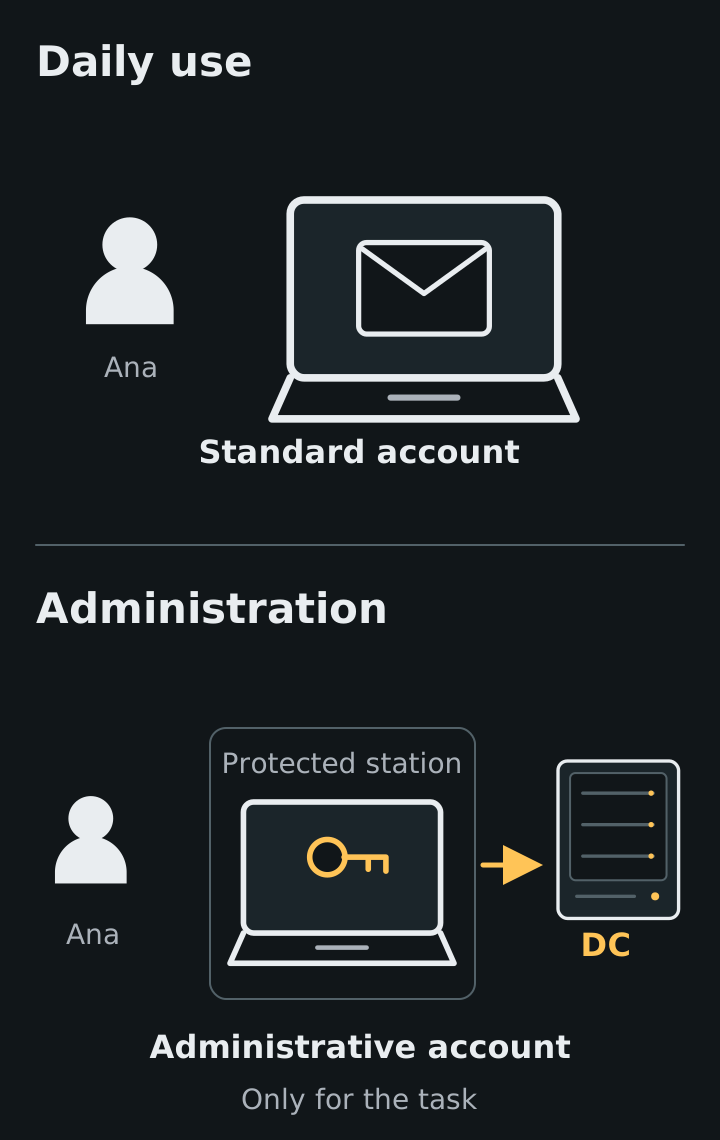
One example is an administrative account used to read email and browse the web. If that routine exposes the account or session, the impact can reach administrative functions. Least privilege guidance is to grant only the rights necessary for the task.
In practice, the team should separate standard and administrative accounts, use protected workstations for administration, review who holds privileges, and keep controllers updated. A limited task does not automatically justify domain administrator access.
More controllers support continuity, but do not replace recovery
A domain can have multiple DCs replicating directory data. The introduction to Active Directory replication explains how changes are distributed. This helps keep the service available when a controller is unavailable, depending on the environment’s design and health.
For example, two DCs depending on the same physical equipment still share a failure point. And replication is not equivalent to backup: an improper change can propagate too. Recovery needs its own planning.
Also avoid concluding that a DC failure immediately stops all access. Existing sessions and tickets may keep working; a computer may allow local sign-in using cached previous domain logon information, depending on configuration. This does not guarantee new access to network resources.
Start by drawing an authorized access
Before installing services, draw Ana’s path: computer, DNS, controller, and folder. Mark who verifies identity and who applies permission. If you can explain why she accesses Projects but not Finance, you already understand an essential distinction.
Do this study in your own environment or with explicit authorization. Use fictional accounts and data; do not change corporate policies, groups, or services without the responsible person. The first safe lab guide helps prepare this separation.
Finally, this article concerns AD DS. Microsoft Entra ID is a cloud identity service with a different model; it is not simply a DC hosted on the internet. Microsoft’s comparison of identity services helps distinguish these architectures. As you continue learning, first identify which service your environment uses.
References
- Microsoft Learn — Active Directory Domain Services overview ↗
- Microsoft Learn — DNS and AD DS ↗
- Microsoft Learn — Kerberos authentication overview ↗
- Microsoft Learn — Access control overview ↗
- Microsoft Learn — Group Policy overview ↗
- Microsoft Learn — Group Policy processing ↗
- Microsoft Learn — Active Directory replication concepts ↗
- Microsoft Learn — Securing domain controllers against attack ↗
- Microsoft Learn — Implementing least-privilege administrative models ↗
- Microsoft Learn — Cached domain logon information ↗
- Microsoft Learn — Compare identity solutions ↗